📣 Message Blasting from the MCP
Your AI assistant can now run the Message Blaster using the MCP. Ask your assistant of choice to draft an announcement, share it with your team for comments, then schedule or send it to Slack channels and DMs. It can also read and edit messages the Tightknit app already posted in public channels. P.S. I used the MCP to draft and send this message!
🚀 Improvements
Community Site
Slack GIFs show on the community site - GIFs sent with Slack's GIF picker and GIPHY's now appear on posts synced to the site.
Join button is now the primary button - The call to action button in the header is now the primary header button, with Log In as the secondary button.
Links in the announcement banners - The site banner now supports links and basic rich text formatting.
Open members in Studio from the site - Admins see an Open in Studio link on member profiles, so they can act on a member right away.
Sign-in method alerts - Members get an email when a sign-in method is connected to or removed from their account.
Studio
Remove event registrants - Admins can now remove someone they registered for an event by mistake. Hosts and speakers keep their roles.
See how pages look in search - Discussion, member and event pages now show a Search Appearance card with a preview and a link to test it in Google.
Pick Slack Connect workspaces by name (Enterprise add-on) - Choose allowlisted Slack Connect workspaces from a searchable list.
Red Hat Display branding font - Red Hat Display is now a supported font family in branding sets.
Message Blaster: drag-and-drop images - Drop an image into the composer to upload it for use in your messages rather than requiring a URL.
Self-serve token SSO (Enterprise add-on) - Set up token (JWT) single sign-on yourself in Studio and choose whether each provider shows on the login page. Enterprise communities can also add email domain aliases, so members with a second company domain sign in to the same account.
MCP
Member notes - Agents can now read and manage your private notes on members.
Top members and channels - get_community_analytics now returns your most active members and busiest channels.
Add members to Slack channels - A new tool adds up to 100 members to a Slack channel.
🔧 Fixes
Slack
A cancelled Slack invite no longer deactivates a member - Cancelling a pending Slack invitation leaves the member's community account active.
Chart poll results show in View Results - Chart polls now display their results in the View Results modal when using Slack chart visualizations.

It's currently in pilot. Just added you to 🔒[private feed]! We can enable it for your Studio.
Carrie M. great question - not yet, but MCP support is coming soon!

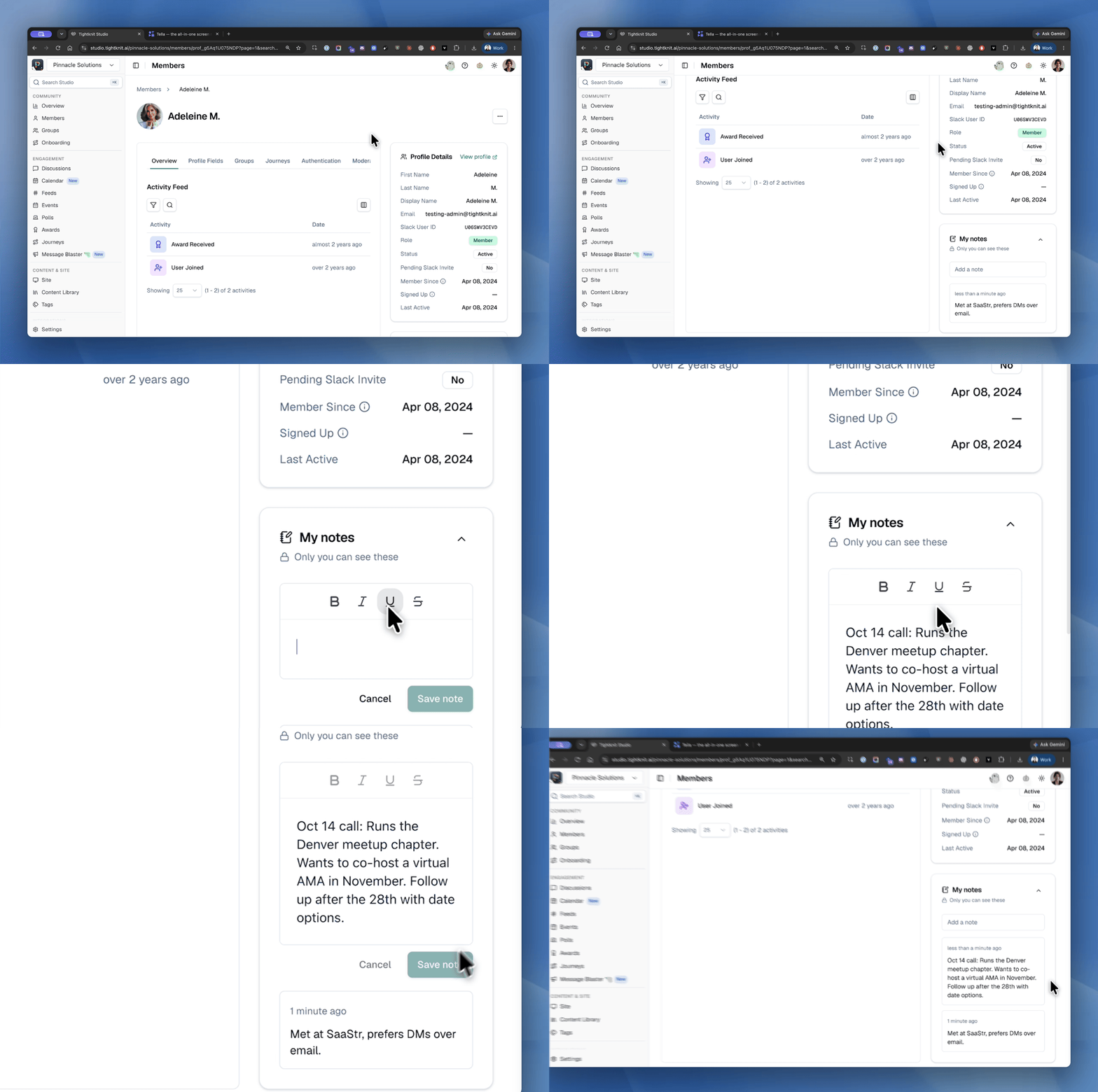
📝 Private Notes on Member Profiles
Keep the context behind every member right where you manage them. Studio admins can now add personal notes on any member's page, such as a call recap, a follow-up reminder, or how they found your community. Notes are visible only to the person who wrote them, so you can jot freely.
🚀 Improvements
Community Site
Search the member directory by profile fields - Directory search now matches the custom profile fields you show on your site, like company or role, as well as member names. Slack dropdown fields marked as shown on site now appear on profiles too.
See result counts on search tabs - Each search tab now shows the number of results.
Studio
Export your community data - Admins can download a ZIP of their community's data from Studio. Reach out to the Tightknit team to turn it on for your community.
Rich text for the login page error message - The message shown to members who can't sign in to the community site now supports links and formatting, so you can point them to a registration page via hyperlinks.
Sort group members - Sort a group's member table by name, email or join date.
Message Blaster: schedule sends as yourself - Scheduled channel posts and DMs can now go out from your own connected Slack account, not just the community bot.
Message Blaster: mention channels with # - Type # in the composer to pick a Slack channel to mention, no raw Block Kit needed.
Message Blaster: Share on LinkedIn block - Enterprise communities can add a button that opens LinkedIn with a prefilled post, so members can spread your announcements in one click.
Message Blaster: invite commenters to drafts - Share a draft with comment-only access so reviewers can leave feedback without editing, and copy the draft link from the share dialog.
See who reached each journey milestone - Journey analytics now show member avatars on each milestone row, with names on hover.
A little spooky season - All October, click the pumpkin beside the theme toggle in the Studio header to try a Halloween theme. 🎃
MCP
Luma link check on events - Creating or editing an event with a Luma link now saves its Luma event, and warns when the link is missing the event ID.
Activity IDs in list_activities - Each activity now returns its own ID, so agents can dedupe and reference individual activities.
Integrations
Clearer Salesforce sync errors - Salesforce syncs now show more accurate reasons behind a 403 Forbidden error when a connection's token has gone stale.
🔧 Fixes
Readable Slack callouts on dark community site themes - @channel, @here, channel mentions and inline code synced from Slack now stay readable on dark site themes.
Slack Connect messages sync from allowlisted workspaces - Messages from external workspaces you have allowlisted in Slack Connect channels are correctly captured.
Hey Aaron, looking into this. All of those emails are marked delivered on our end and we don't see any auth issues. I'll followup with you to dig deeper. Side note: In the Tightknit studio, you can view authentication events on the user's Member page or for the whole community at studio.tightknit.ai/~/workspace/audit?tab=authentication. You may find some helpful debugging info in the future!
Jacob G. circling back to this request - would you want a LinkedIn type component in the Message Blaster, where you can customize the pre-fill text?
Docebo appears to have events/webhooks that trigger for course completions and certificate awards. You'd be able to use that as a trigger to call into the Tightknit APIs, e.g. give an equivalent Tightknit badge award to the community user.
You're spoiling the surprise a little Aaron W. but we're very soon going to roll out the next version of our APIs which will let you programmatically do all the fun stuff you do with our MCP but through API calls too! Shortly after that, we'll be bringing those connectors to the automation platform world (Workato anyone?? 👀) to make it easier to bridge system for use cases exactly like this

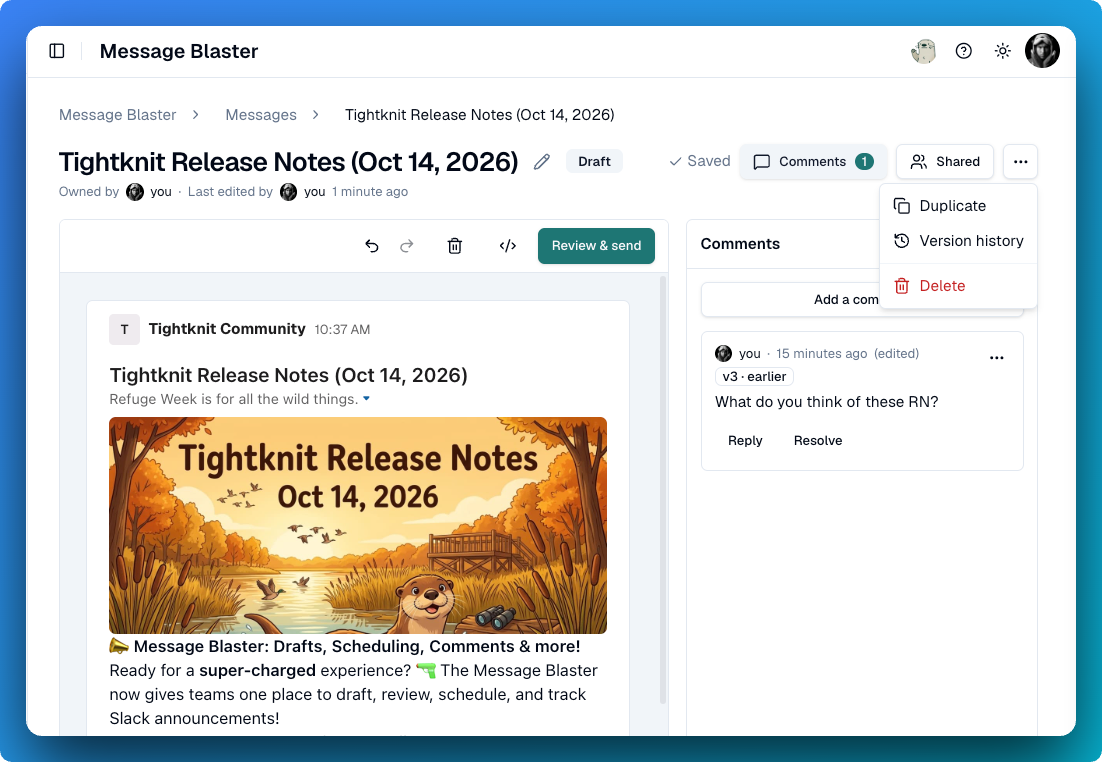
📣 Message Blaster: Drafts, Scheduling, Comments & more!
Ready for a super-charged experience? 🔫 The Message Blaster now gives teams one place to draft, review, schedule, and track Slack announcements!
Messages are autosaved as you edit
Save and return to message drafts
Track and restore version history of your drafts
Share your saved message with your team
Comment on specific parts of the message with your team
Schedule a message to be sent later
Track the status and success of sent messages
View all of your drafts and scheduled messages in the Messages List or on the Calendar
Want to try out the Message Blaster? Come join the pilot in #pilot-message-blaster.
🛠️ Improvements and Fixes Community Site
Register for events without on the community site - Members can now register for events directly on the community site, with registration activity and notifications handled automatically.
Mention members in posts and comments - Type @ in the post or comment composer to tag members in that feed.
Improved search engine discovery - Expanded sitemaps, page-level indexing controls, and faster indexing submissions help public community content appear correctly in search results.
Table support when syncing Slack messages - Slack tables, data tables, and markdown blocks now carry through sync and render on the community site.
Studio
Return to saved AI Assistant conversations (Enterprise) - The AI Assistant now keeps conversation history so you can reopen, rename, continue, or delete earlier threads instead of starting over.
@Mention members across rich text fields - Event, award, group, onboarding, Community Home, and Message Blaster editors now include an @ member picker.
Choose permissions when creating API keys (bugfix) - The Create API key dialog now includes a permission picker so each key can receive the appropriate API access.
Slack
Update the community invite link from Slack - Slack admin settings once again include the field for changing the community's static invite link.
MCP
Add event registrants from your agent - MCP tools can now add people as event registrants, including members who do not have a Slack account.
Open member profiles from MCP results - Member tools now return public community-site profile URLs when a visible profile is available.
Integrations
Keep Salesforce syncs moving past blocked records - A permanently blocked Contact or Lead creation no longer stops later members and activities from syncing.
Coming next release!