

Tightknit Release Notes (Aug 19, 2026)


🧭 Journey Progress Analytics
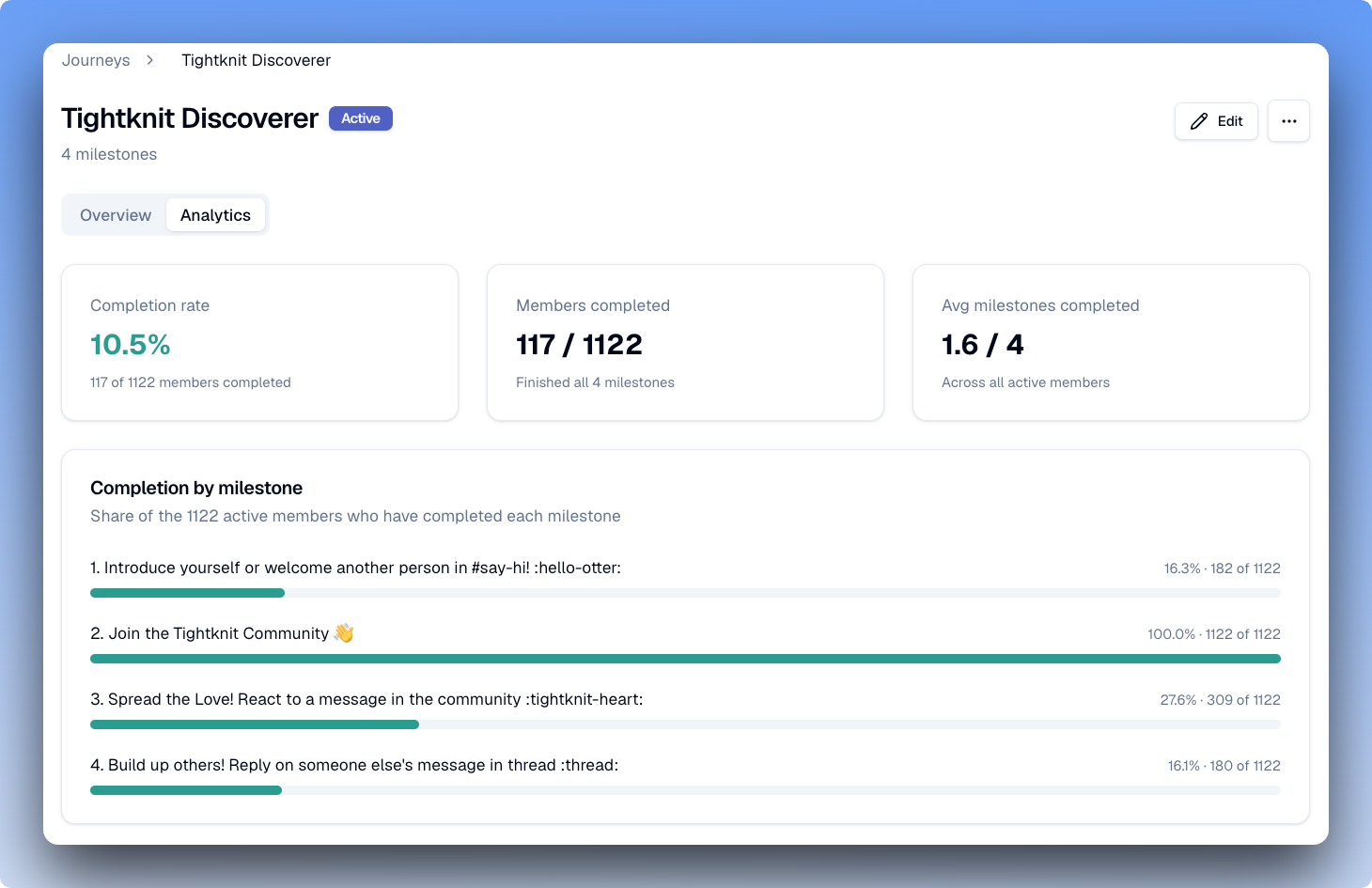
You can now see how members are moving through every milestone of a journey, in the journey's Analytics tab in the Studio. Discover many members have completed each milestones, who has completed the journeys, and spot exactly where people stall. Every member's detail page also gets a Journeys tab showing that user's progress across all your active journeys. If you run an onboarding or cohort program, this is an invaluable tool to keep track of what is actually working.
🧭 Feed Analytics
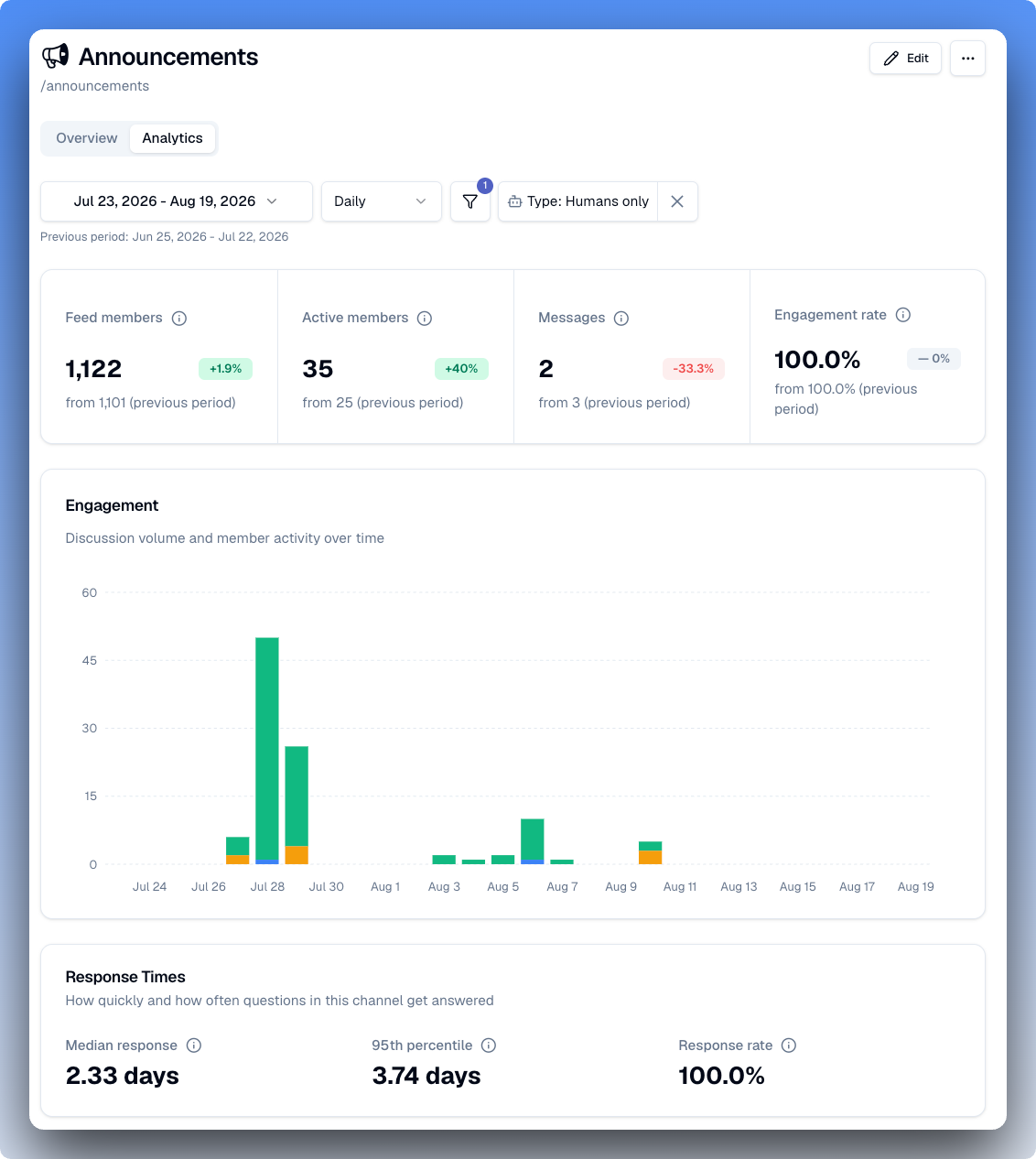
Do a deep dive into your stats per channel or feed in the new Analytics tab on the feed detail page. View analytics scoped to each feed, including a channel scorecard, engagement trend, time to first response, response rate, ranked active members, and more!
🛠️ Improvements and Fixes Studio
Channel analytics on every feed - Each feed detail page now has an Analytics tab with a channel scorecard, engagement trend, time to first response, response rate, and a sortable list of the most active members in that channel. Different channels get measured differently, so every number is scoped to just that one.
Create your community site from Studio - Communities without a site can now set one up through a guided wizard in Studio.
See who has an award - The award detail page now lists every member who has received it.
All page banners in one place - Community site page banners are now managed in the Site settings > Page Banners section.
Invite members to Slack as you add them - Invite members to your Slack workspace as you add them to Tightknit, through our new admin operations suite. This is an Enterprise Add-on feature, available only to customers on an Enterprise Grid slack plan.
Settings moved to the sidebar footer - Settings now live in a pinned sidebar footer with nested navigation, and the sidebar tells you when nav items are cut off below it.
Community Site
Merge SSO sign-in accounts by email - When you sign in with SSO and the email already belongs to a Tightknit account, you now get a confirmation email that links the two with one click.
Branding now covers borders and highlights - Your configured palette now drives border, background, and highlight colors across the community site.
Page banners now show on mobile - Banners were hidden on small screens, so mobile visitors never saw them. They now render at every screen size across the home, events, groups, members, resources, collections, and feed pages.
MCP
Member awards and journey progress - You can now ask for a member's earned awards and their progress through journeys, with filtering.
Event guest lists - A new list_event_attendees tool returns who is coming to an event, paginated.
Event cover images - Event tools now return the cover image URL, so you can reuse the event graphic when writing a recap.
Archive and unarchive feeds - Feed archiving is now split into archive_feed and unarchive_feed, which respect your plan's active feed limit and run the same side effects as Studio.
Group membership awards - Creating or editing a group can now set the award members receive for joining it.
Mark members as teammates - A new edit_member tool sets whether a member is part of your team.
Event end dates - Whether an event shows its end date is now readable and settable from the event tools.
Send us feedback from your MCP client - A new submit_feedback tool files feedback about the MCP straight to our team.
Site updates appear immediately (bugfix) - Editing a post or comment through the MCP now refreshes the community site right away instead of waiting for the cache to expire.
API
Invite new members to Slack from the Members API - Creating a member through the Members API can now send their Slack invite in the same call, using the new invite_to_slack and slack_channel_ids parameters. Available for Slack Enterprise Grid workspaces only.
Misc
Threaded reply milestones count unique threads (bugfix) - The threaded reply milestone was crediting every reply in the same thread. It now counts one per thread, as documented.