🛡️ AI-powered moderation for your community (Beta)
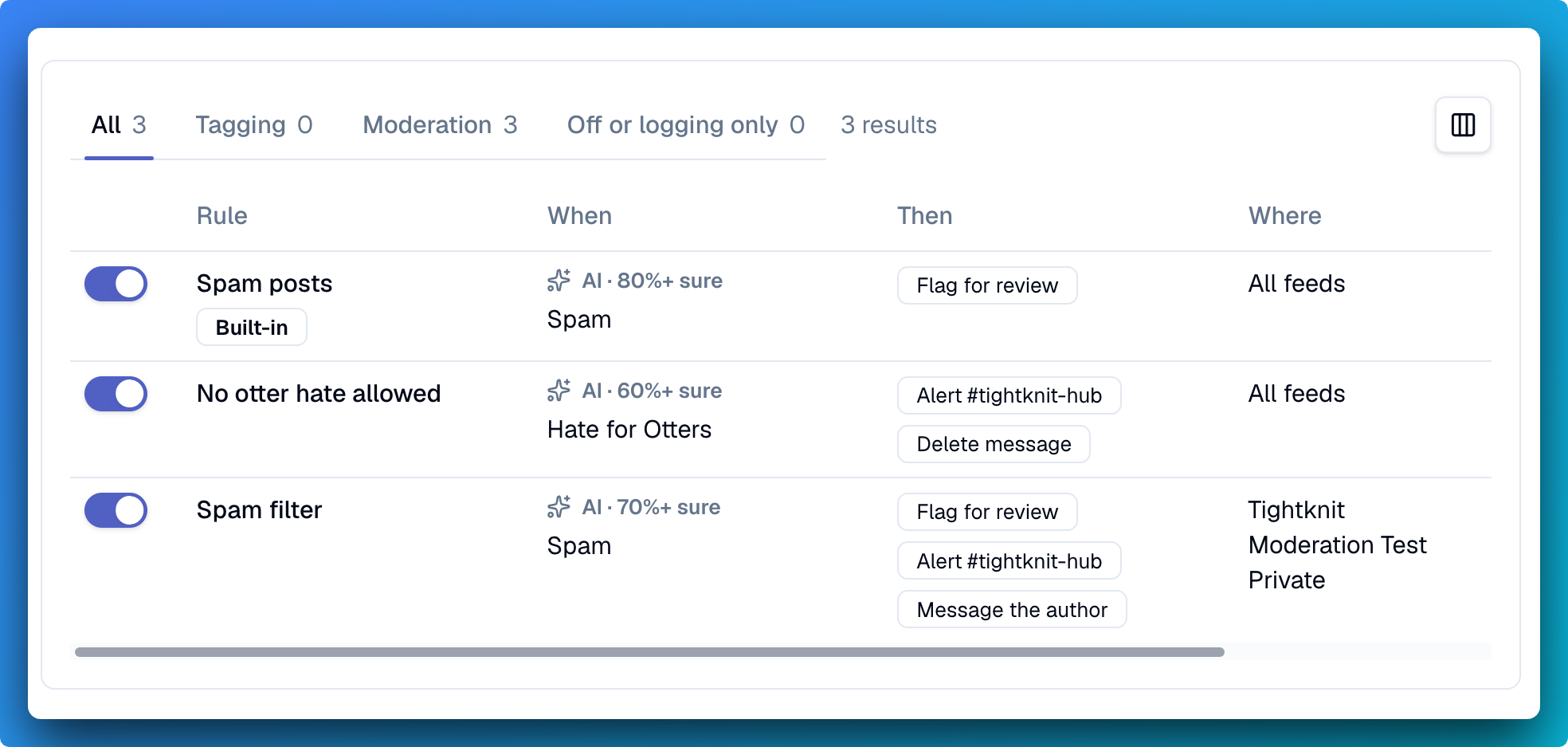
Spam, self-promotion, posts in the wrong channel, code of conduct violations... these are all increasingly difficult problems for online communities and also some of the most mundane and un-fun work for community professionals. Let Tightknit help you keep an eye on things with our new Moderation platform. Learn more about moderation in the docs. If you'd like to join the beta, react to this post with 🛡️ or reach out to support!
AI-powered rules engine
Create criteria with confidence thresholds for AI-evaluated triggers on your moderation rules, which can be used to automatically perform actions on incoming messages such as sending alerts, pushing messages to a moderation review queue, sending the author a customized message, and even auto deletion (for the especially naughty ones).
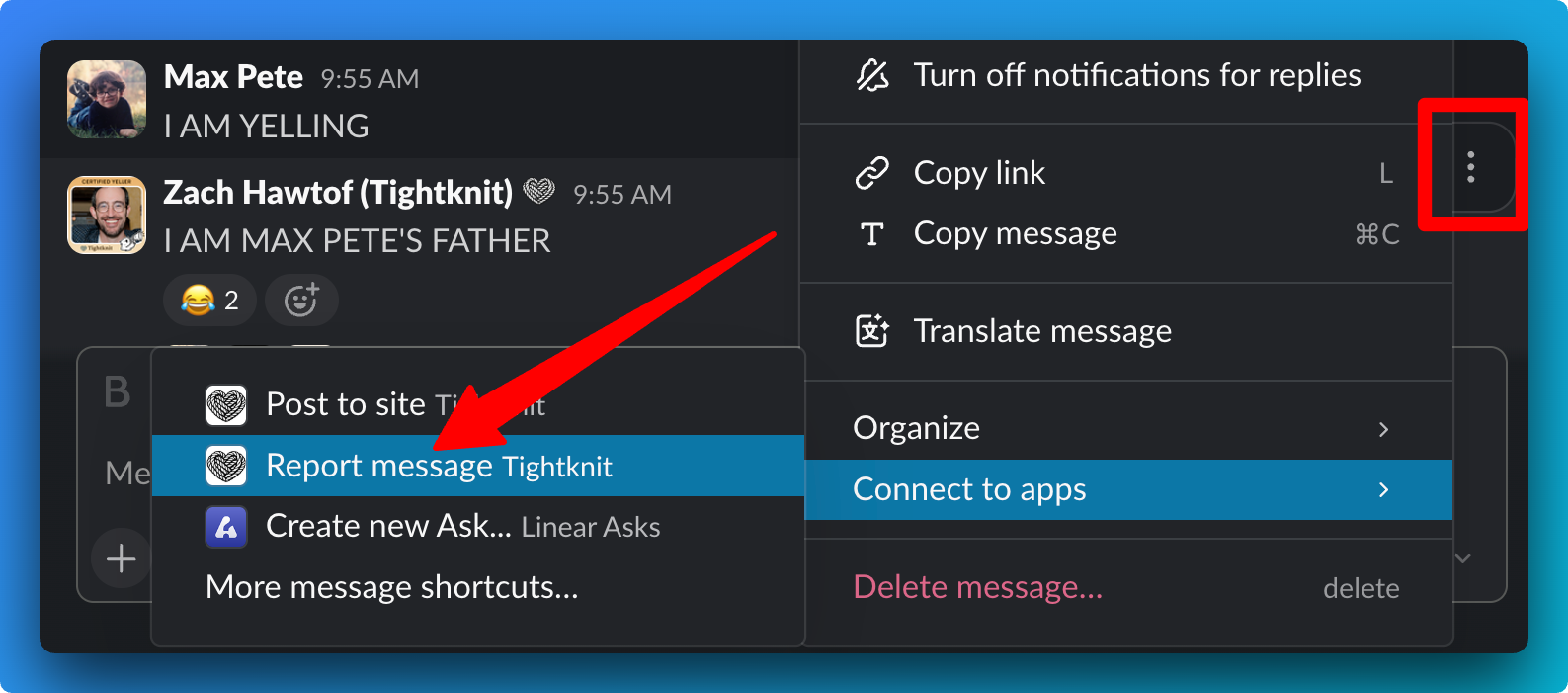
Your members can report messages
Members can report a message in Slack using the Report message message shortcut on any channel message or DM. The report alerts your team and lands in your review queue.
👋 Greet new members by name
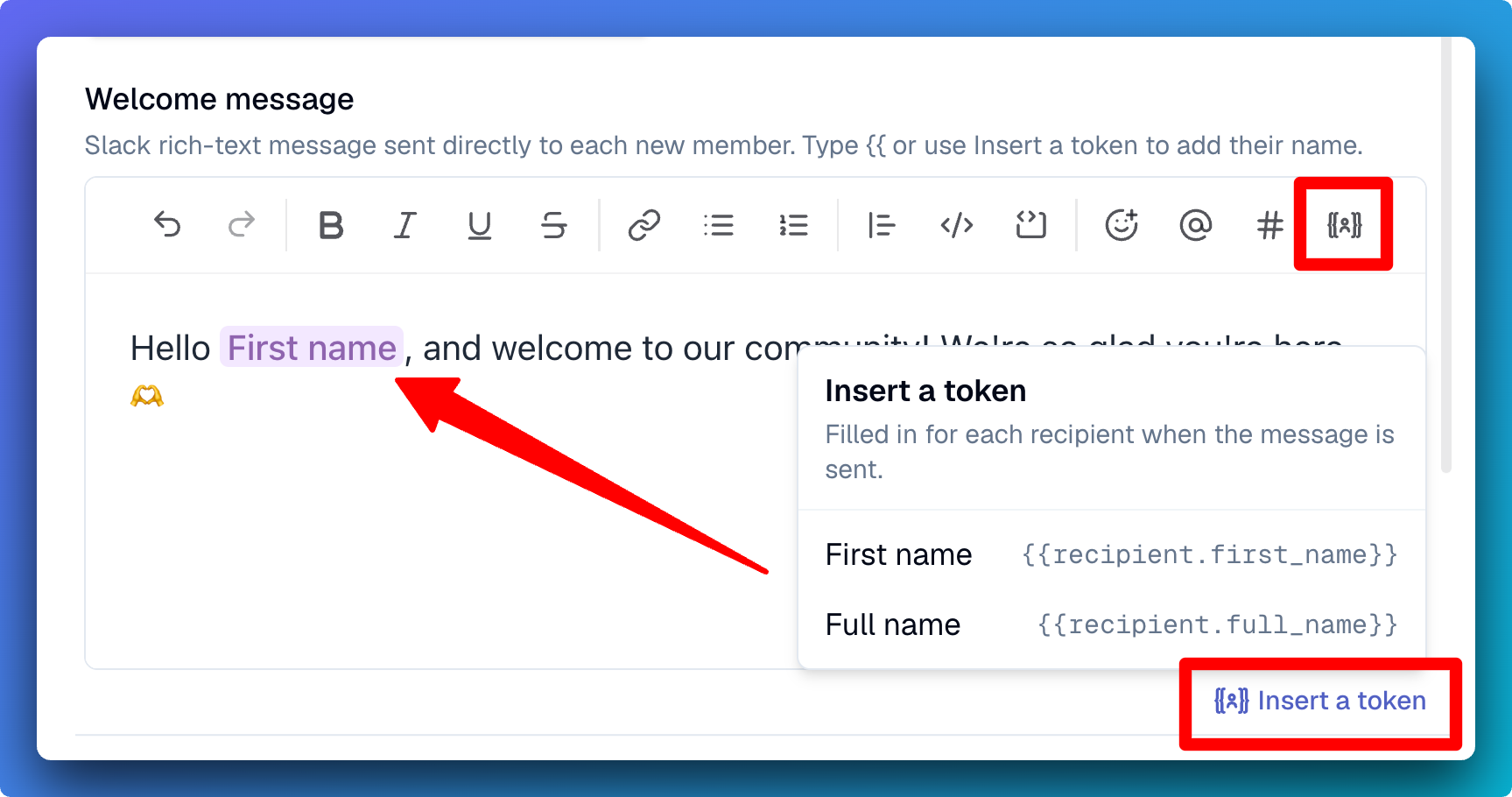
Your onboarding welcome DM can now use {{recipient.first_name}} or {{recipient.full_name}} tokens, which will be filled in based on their Slack profile when the message is sent. Click the token icon in the toolbar or below the editor, or start typing {{, to insert a new token.
📌 Notices on posts (Enterprise)
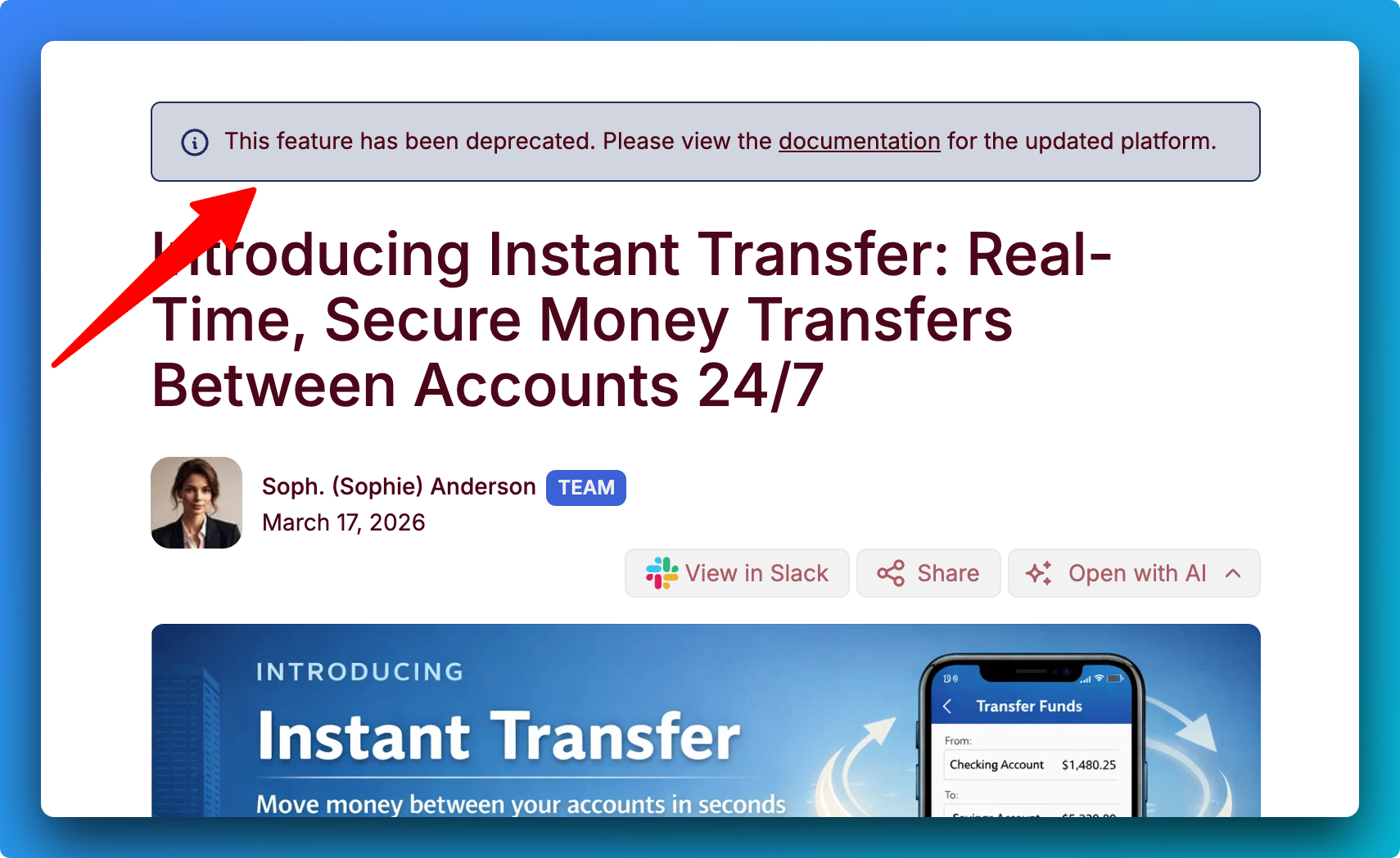
Sometimes threads on your site need a notice, such as if there is an ongoing effort underway or certain information is out of date. Admins can now add a short note above any post on your community site, such as "This answer is out of date, see the new guide", without needing to edit or remove the post. Notices are reflected in the SEO page metadata. Add a notice to a post using the MCP or from the Discussion page in the Studio.
🎯 Milestones across several channels (Enterprise)
Previously journey milestones were limited to 1 or all your available channels. Customers on the Enterprise plan can now scope a journey milestone to up to 5 specific channels.
👤 My Profile page for site users
Members now have a private home on your community site. View Profile in the avatar menu is now My profile, where sign-in members can check out their journeys progress, the awards they've received and given, and the events they've registered for.
🎯 Journeys for the right audience
You can now limit a journey to the members of selected groups, which is great for programs like MVPs or customer experts. Set it when you create or edit a journey in the Studio or Slack app home. Members outside those group(s) will not see the journey.
🚀 Improvements
Community Site
Forwarded Slack messages show on the site - A forwarded message now appears as a quote under the post, naming its original author and where it was posted (except for private sources).
Studio
Tag messages (pilot) - Tags can be applied to posts or comments.
Internal-only tag groups (pilot) - Internal tag groups and their tags are only visible to your team, never to members.
New Message Blaster editor (pilot) - Write on a canvas that looks like the Slack message it will become, then choose who it's from, who it goes to and when, right above the message. Use Send test message to self to see it in Slack first.
Edit member names - Admins can directly edit the display name of site community members from their member page in the Studio.
Search and filter Events - Find events by name and narrow them by status on the Events page.
Sort members by email - The Members table can now be sorted by email.
Custom script for your site (Enterprise) - Admins can add a head script, such as a cookie-consent banner, under Website > Custom script.
SSO for Studio sign-in (Enterprise) - Set up single sign-on for Studio yourself under Settings > Workspace, or invite your IT admin to do it.
Slack
Activate new public channels automatically - A new setting has Tightknit join and activate new public channels for you. It's off for existing communities, and you can turn it on under Integrations > Slack or when you activate a channel.
Feeds follow their channel status - Deleting a Slack channel now archives its Feed. When a channel is archived or unarchived, the Hub message has a button to do the same to its Feed.
Clearer Hub alerts - Event alerts are smaller and name the fields that changed, tag alerts name the tag group, and channel alerts name who activated the channel.
MCP
Tag messages (pilot) - Agents can set a message's tags with set_message_tags and filter posts and comments by tag.
Edit login page settings - edit_site can now change the login error message and legal links.
Configure the Hub and team notifications - Agents can set your Hub channel and choose which team notifications post there.
Edit member names - A new edit_member tool renames members who have no Slack profile.
🔧 Fixes
Links displayed in pinned posts on the site - Hyperlinks in pinned posts can now be clicked.
Message Blaster previews match Slack's spacing - The space under headers and lists now looks the same in Studio and in Slack.
Sign-in code screen explains a missing code - After 30 seconds, a Still no code? panel suggests next steps, including that no code arrives without an account.

▶︎ Related Discussions
Tightknit Release Notes (Oct 8, 2026) (1 month ago)
Tightknit Release Notes (Mar 5, 2025) (1 year ago)
Tightknit Release Notes (March 12, 2025) (1 year ago)
▶︎ Related Discussions
Tightknit Release Notes (Oct 8, 2026) (1 month ago)
Tightknit Release Notes - January 7, 2026 (10 months ago)
Tightknit Release Notes (Aug 26, 2026) (2 months ago)
▶︎ Related Discussions
Tightknit Release Notes (Mar 5, 2025) (1 year ago)
Tightknit Release Notes (Oct 8, 2026) (1 month ago)
Tightknit Release Notes (May 5, 2026) (6 months ago)
Tightknit Release Notes (March 12, 2025) (1 year ago)
▶︎ Related Discussions
Tightknit Release Notes (Mar 5, 2025) (1 year ago)
Tightknit Release Notes (March 12, 2025) (1 year ago)
Tightknit Release Notes: Aug 2025 Updates and Fixes (1 year ago)
▶︎ Related Discussions
Tightknit Release Notes (Aug 26, 2026) (2 months ago)
▶︎ Related Discussions
Tightknit Release Notes (Aug 26, 2026) (2 months ago)
Tightknit Release Notes (May 27, 2026) (5 months ago)
Tightknit Release Notes (Apr 21, 2026) (6 months ago)
Tightknit Release Notes: Major Updates for Nov 15, 2024 (2 years ago)
▶︎ Related Discussions
Tightknit Release Notes - January 7, 2026 (10 months ago)
Tightknit Release Notes (March 12, 2025) (1 year ago)
▶︎ Related Discussions
Tightknit Release Notes (May 27, 2026) (5 months ago)
Tightknit Release Notes (Mar 5, 2025) (1 year ago)
Tightknit Release Notes: Aug 2025 Updates and Fixes (1 year ago)